Workflow Engine Features
Benefits
Why choose Workflow Engine by Optimajet
With Workflow Engine, it's never been easier to add a fully operational workflow automation solution into your existing .NET / .NET Core system. Our ready-made engine and comprehensive documentation let you get down to development faster, and hit the market sooner.
Customizable
Vendor-provided source code — customize and make changes without any assistance.
Customer support
Over the past year we have implemented 95% of customers' requests for new functionality.
Requires no special training
Any developer can write a Proof of Concept. Visual Designer can be embedded in a webpage — making it easy to use for non-technical users.
Perpetual license
Pay just once and use the current version forever. One-year updates subscription included.
Designer
HTML5 Visual Designer
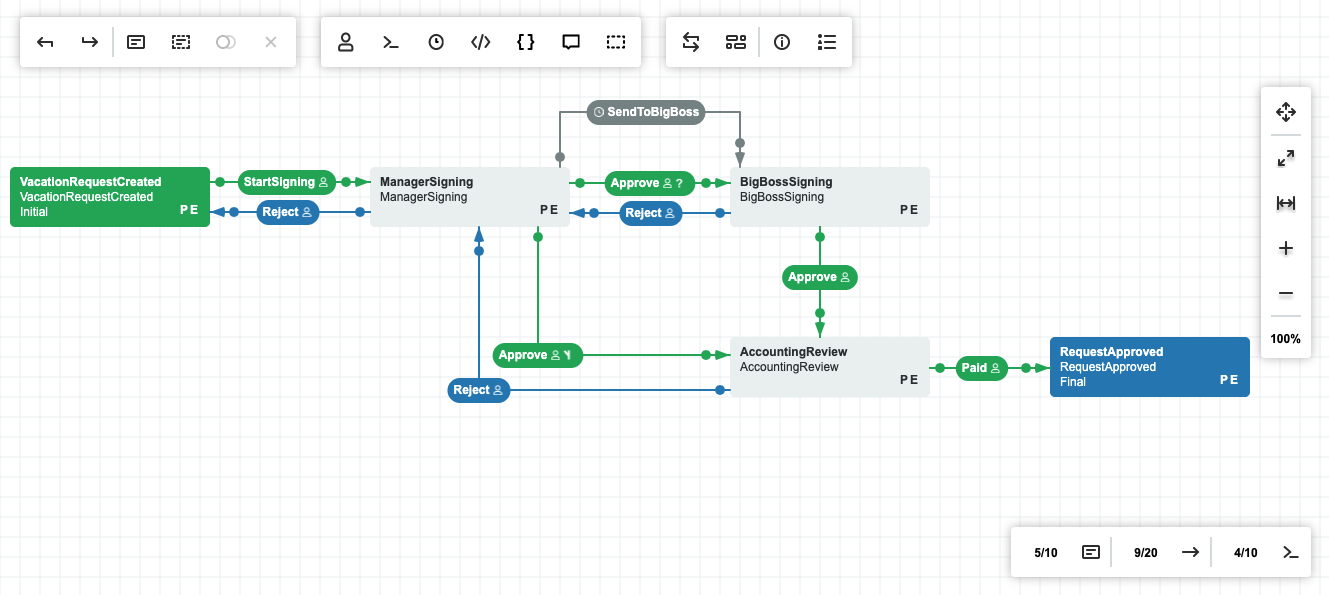
We realize that not everyone is a developer. That's why Workflow Engine by Optimajet comes with a built-in HTML5 visual designer that lets you create interactive workflows of any complexity — no need to draft them programmatically. Design, model, edit, and visualize your custom workflows right in the browser.
Drag & Drop
Drag & drop your workflow activities to the desired location on the canvas without losing connections, or add new transitions between activities.
Fully adapted for business uses
Workflow Designer is a simple and user-friendly tool that allows any user to change routes.
Full customization
You can easily change any element of the Designer — for example, the form controls.

How B.F. Saul automated 500+ processes and replaced SharePoint

Core components
The building blocks of every workflow
Workflow Engine by Optimajet offers its users all the components necessary to implement workflows of any complexity; and helps them to maintain consistent business processes. Workflow Engine is designed to improve organizational efficiency and productivity, allowing companies to concentrate on job performance rather than workflow management.
Activities
Define statuses and the set of methods executed when a process enters that state — the atomic steps of every workflow.
Transitions
Connect activities with rules that move the process forward — triggered by commands, timers, or conditional branches.
Actions
Execute custom code during an activity — call APIs, update data, send notifications, or any other side effect the process requires.
Actors
Assign users, groups, or systems to roles in the process. Route tasks to the right participants and enforce responsibility at every step.
Commands
Trigger specific transitions from the UI or API. Commands expose the actions a user or system can take on a process in its current state.
Timers
Schedule transitions by interval or absolute date/time. Drive SLAs, escalations, reminders, and any time-bound behavior declaratively.
Workflow Engine provides a flexible and extensible architecture, a powerful workflow engine and an intuitive visual workflow designer that enables us to rapidly modify our application to meet the needs of our clients.

Mark West
CEO, Innovum Technologies
Version control
Track changes. Roll back when needed.
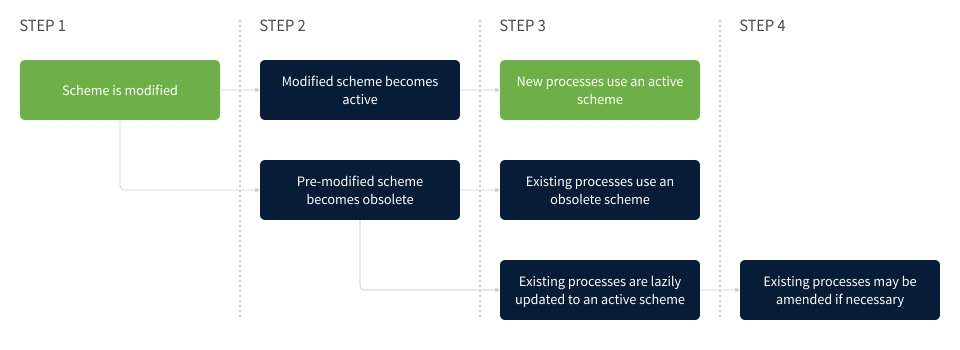
Workflow Engine by Optimajet comes with built-in version control that helps you keep track of any changes introduced to your workflows and revert them when needed. Whenever you update a workflow, the engine versions your changes, letting you choose whether you want existing processes to finish running the old version or to force them to run the new one.
Parallel workflows
Run branches in parallel — then merge.
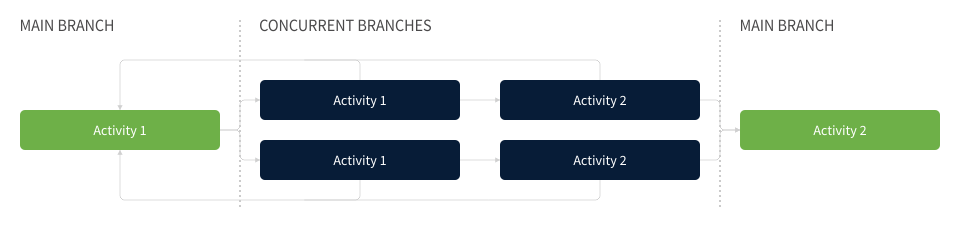
Workflow Engine by Optimajet lets you split a process into multiple branches that execute concurrently. Each branch runs its own activities, and when all of them complete, the workflow merges back into a single flow and continues. Model complex business logic without sacrificing clarity or performance.
Workflow essentials
Everything a process needs at runtime
Versioning, concurrency, scheduling, and interop — built-in, not bolted on.
Version Control
Every change to a workflow is versioned. Decide whether existing processes finish on the old scheme or migrate to the new one — rollback is always available.
Parallel Workflows
Split a workflow into branches that execute concurrently. When all branches complete, they merge back and the process continues.
Timers
Attach custom timers to transitions — intervals in ms / seconds / minutes / hours / days, or specific date/time triggers. UTC by default, custom formats supported.
XML Import / Export
Workflows are stored as versioned XML definitions. Export for backup and sharing; import to reuse schemes across projects and environments.
Localization Support
Localize states, command names, and input parameters into any language, right from the Designer toolbar. No code required.
BPMN 2.0 Support
Model your processes in any BPMN 2.0 tool and execute them inside Workflow Engine — letting analysts and developers work in the notation they already know.

Runs on your .NET stack
Workflow Engine by Optimajet comes in a .NET build, enabling you to run it in any environment that supports these technologies and integrate it into your .NET solutions. Plus, the engine is supplemented with a set of providers that allow you to connect it to a DBMS of your choice.








Platform & integration
Runs where your stack already is
Deploy into any .NET environment, integrate via component or REST, and plug in the security layer you already use.
Compatibility
Runs on .NET / .NET Core — any environment that supports the runtime. Ships with providers for Microsoft SQL Server, PostgreSQL, Oracle, MySQL, MongoDB, Azure SQL, and Redis.
Integration Options
Embed as a .NET component, or run Workflow Server and call via REST API. The Designer can be embedded natively or via iframe when styles need isolation.
Your Own Security Layer
Workflow Engine ships with no embedded security — by design. Plug in whatever auth and access control model your application already uses, without fighting hardcoded rules.
Integration options
Two ways to integrate
Pick the path that fits your application — embed as a .NET component, or run Workflow Server and talk to it over HTTP.
Server-side integration
We have prepared detailed instructions on how to integrate Workflow Engine into your .NET or .NET Core project. If there is no possibility to integrate Workflow Engine into your project, just launch Workflow Server and call methods via HTTP API.
Designer integration
Use our step-by-step instructions to integrate Workflow Designer into your application. If you are having trouble with styles, use integration via IFrame. If you are using Angular, check one of the following examples: Angular Test, Angular Boilerplate.
Want a deeper look?
Talk to our team about fit, licensing, and integration for your project.